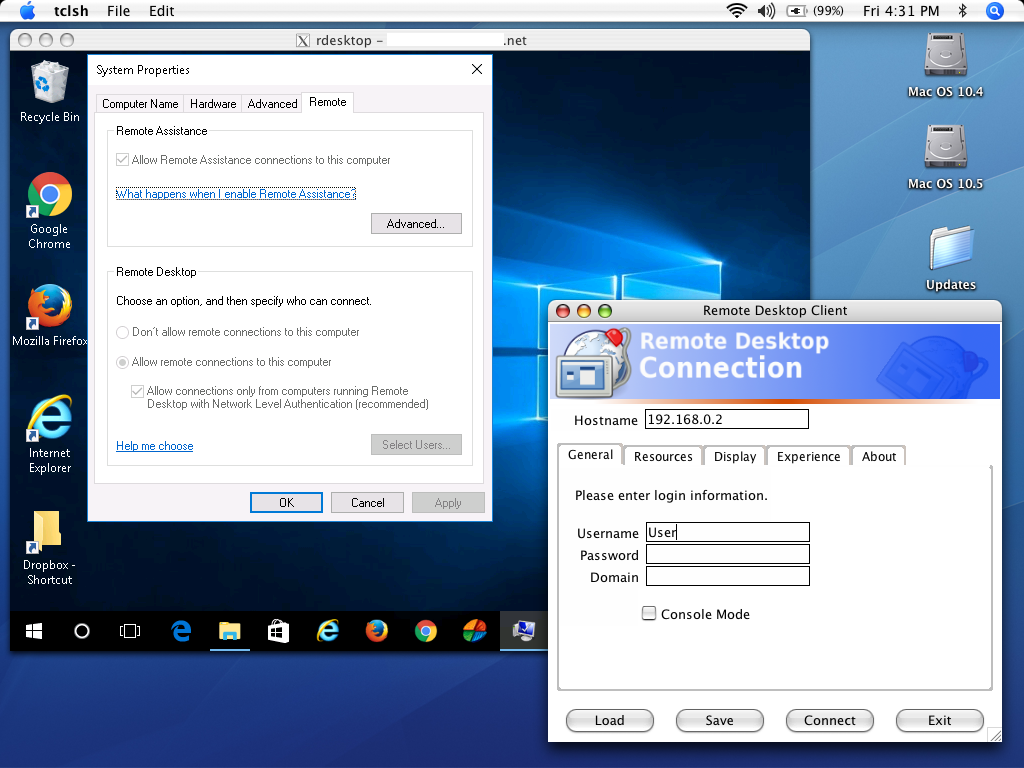
September 29, 2016 - Version 2.0

RDPv6 Network Level Authentication - CredSSP/NTLMv2 support
for Mac OS X Tiger (10.4) and Leopard (10.5) PPC Macs

I was annoyed to discover I couldn't connect to a
newly-provisioned Azure VM from my iBook G4.
After a decade of no major changes I revived this project to allow
PowerPC Macs to connect to modern Windows hosts over RDP.

Download TSclientX 2.0 (PowerPC)

The GTK frontend has been replaced with a GUI
written in TCL, and VNC support has been dropped.

The rdesktop command history created by the GUI is located in
 ~/.rdesktop/rdesktop_history.log
Use this to run rdesktop from the terminal instead of the GUI

Thanks to opensource.dell.com

---------------------------------------
Installation
---------------------------------------

IMPORTANT:
Copy TSclientX into your /Applications folder.
This step is *required* - TSclientX will NOT run from an alternate location.

If TSclientX doesn't start, open a terminal and run:
"sudo /usr/X11R6/bin/fc-cache"
-- This will rebuild X11's fontconfig cache.
If you've never used X11 before be patient;
it can take a minute or two to fire up on first-run.

---------------------------------------
What is TSclientX?
---------------------------------------

TSclientX is a Windows Terminal Services client for Mac OS X. It
appears to be a regular Mac OS application but is in fact an assembly
of free software working in concert to provide similar (better?)
functionality to the official Remote Desktop Connection from Microsoft.

What makes TSclientX interesting compared to other Mac RDP Clients?

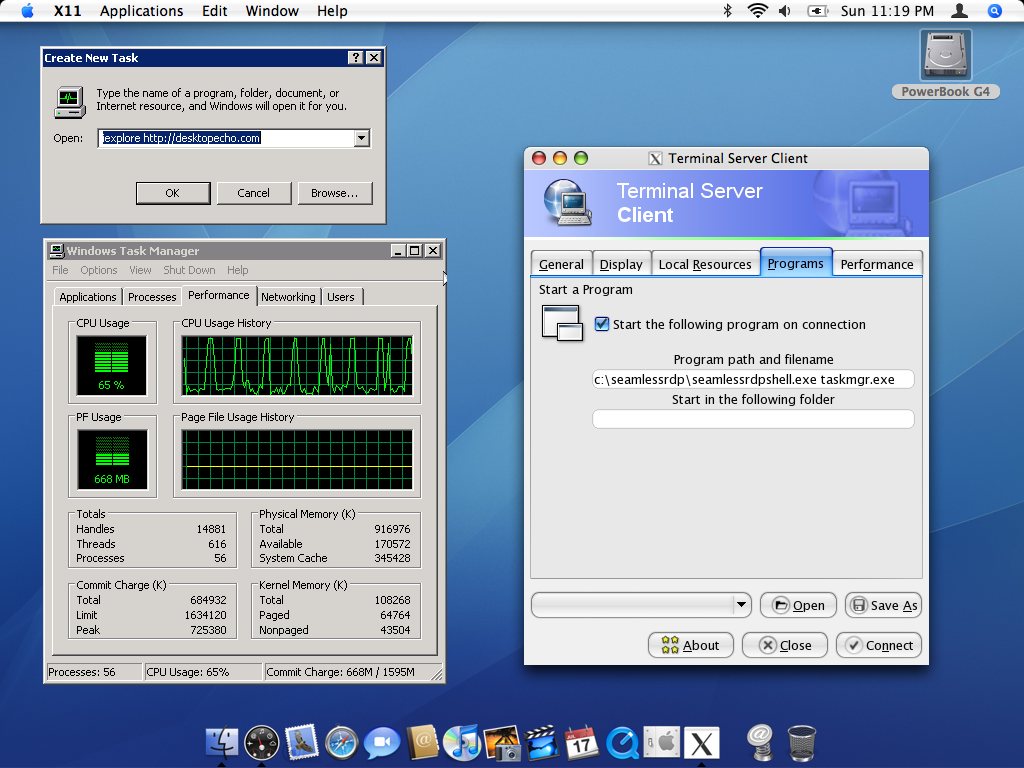
- SeamlessRDP is brought to you by Cendio's SeamlessRDP component.
It was originally introduced in rdesktop 1.5 and just simply rocks.
HINT: Download Cendio's SeamlessRDP component from
http://www.cendio.com/seamlessrdp and extract to C:\SeamlessRDP
 Check the "Fullscreen + SeamlessRDP" box in the Display tab and
 in the Programs tab under "Program path and filename" type in:
 "C:\SeamlessRDP\seamlessrdpshell.exe taskmgr.exe"
 (Without the quotes, you'll get the idea quickly enough)

- Multiple instances of TSclientX can be easily started.

- Stability and speed on Intel Macs (and PowerPC Macs for that matter)
 has been found by many to be superior compared to the official
 Mac RDP client.

The most interesting ingredients are:

rdesktop 1.5 - http://www.rdesktop.org
An open source client for Windows NT Terminal Server
and Windows 2000/2003 Terminal Services

tsclient 0.148 - http://www.gnomepro.com/tsclient
A frontend for rdesktop and other remote desktop tools

libao 0.86 - http://www.xiph.org/ao
A cross platform audio library with CoreAudio support.

The GUI uses an optimized GTK+ build, specifically compiled for TSclientX.
Like most Unix-derived software on the Mac, Apple's X11 is required.
There are no other prequisites. It will not interfere with MacPorts
or Fink installations already on your system.

---------------------------------------
Tips
---------------------------------------

Don't have X11.App in your MacOS 10.4 install?
It's on the Tiger install DVD, in /System/Installation/Packages/
You will want to install "X11User.pkg" to get up and running.

To get true full-screen mode you must enable the full-screen feature from
X11's preferences menu. When enabled, CMD-OPT-A will switch between
X11 and Aqua.

Normally X11 will open an xterm on launch, which can be distracting.
To avoid this behavior, create your own X11 ".xinitrc" file.
First, In Terminal, type "cp /private/etc/X11/xinit/xinitrc ~/.xinitrc"
Then edit .xinitrc and remove the line referring to xterm,
it's near the bottom of the file.

SeamlessRDP Support is experimental. You need to obtain the
Windows-based component from http://www.cendio.com/seamlessrdp.
Extract Cendio's binary to C:\SeamlessRDP on the Windows machine.
In TSclientX, check the "SeamlessRDP Mode" in the Display tab
and enter the program name in the Programs tab. Beware the
minimize/maximize buttons aren't all that well behaved.

As-per the official VNC source code, F8 will bring up the
VNC Viewer options once the correct password has been entered.

---------------------------------------
Known Issues
---------------------------------------

- The "tsclient" component may get too chatty and reports an
"error" on exit. Feel free to ignore the extra verbosity.
Hint: Use RDP5 for Windows XP and 2003 to help minimize this.

- Sound support may work really well or may get mad at you and
drop the connection. When it works it works really well.
Working with rdesktop CVS to fix it in the future!

- For some odd reason, Apple deviated from the VNC protocol
specification and as a result RealVNC 4 will not connect to
Apple Remote Desktop powered VNC Servers. I'm working on
either hacking the RealVNC sources or using a different VNC
Viewer. That said, connections to any other VNC servier in
the known universe should work fine.

---------------------------------------
ChangeLog
---------------------------------------

September 7, 2006 - Version 1.01 (Intel)
- Initial Release

October 15, 2006 - Version 1.03 (PowerPC)
- Updated to rdesktop version 1.5 final
- Updated libao to 0.86
- Integrated SeamlessRDP

October 24, 2006 - Version 1.10 (Intel/PowerPC)
- Unified and rolled-up TSclientX's development for X86/PPC
- Various QA fix-ups to make the world a better place
- Integrated folder sharing! -- See the "Options" tab

May 9, 2009 - Version 1.12 (Intel/PowerPC)
- OS X 10.5+ Compatibility

September 29, 2016 - Version 2.0 (PowerPC/Rosetta)
 - Complete redesign

---------------------------------------
Everything Else
---------------------------------------

This package is provided "AS-IS" with no warranty.

Questions or feedback? Feel free to contact me:

Daniel Milisic

|